Git – repository 遠端操作出現 「Please make sure you have the correct access rights...SSH或權限錯誤 - GitHub
in Blog Last modified at:

之前因為自己公司筆電跟自家桌機常常需要切換開發,導致我自己的個人部落格在不同電腦上要進行同步,或是在接手專案要維護的時候,準備要 git pull 卻出現錯誤。去google網路看是不是SSH的問題,但查了又不是此類的問題,如果你也剛好遇到此問題可以來試試以下這段:
$ git push origin master

ERROR: Repository not found.
fatal: Could not read from remote repository.

--------------

Please make sure you have the correct access rights
and the repository exists.

ERROR: Repository not found.
fatal: Could not read from remote repository.
上google了解是因為使用 ssh 連線到 GitHub 但可能出現 key 導致錯誤發生,不想再替換SSH或重新安裝的人,可以重新設定識別資料或是設置password來解決這個困擾。
方法一: 取消與remote連接,重新連接後,並設定識別資料
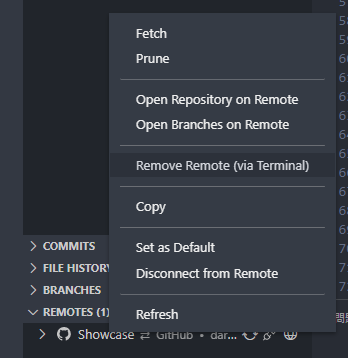
$ git remote add origin git@gitlab.com:XXX
$ git config --global user.name "John Doe"
$ git config --global user.email johndoe@example.com
方法二: 更換與遠短連接方式,重新請求設定 username 與 password
# 先確定目前remote連結
$ git remote -v

# 若如果出現這樣,可發現之前用的是走 https 通道
origin	https://github.com/{username}/{repo}.git (fetch)
origin	https://github.com/{username}/{repo}.git (push)

# 接著試試(應該是不會給過)
$ git remote add origin git@github.com:{username}/{repo}.git

# 然後會說已經存在
fatal: remote origin already exists.

# 接著設定 set-url 修改為走模式 SSH 連線方式
$ git remote set-url origin https://github.com/{username}/{repo}.git

# 確認一下
git remote -v

# 代表成功替換
$ origin	git@github.com:{username}/{repo}.git (fetch)
$ origin	git@github.com:{username}/{repo}.git (push)

# 然後將專案 pull
$ git pull

# 伺服器就會詢問 GitHub 帳號密碼了
Username for 'https://github.com':
Password for 'https://github.com':
參考來源
1.6 開始 - 初次設定 Git https://git-scm.com/
Git – GitHub 出現 http://jsnwork.kiiuo.com/